TRUST FUND AGREEMENT OVERVIEW
Departments will initiate a Trust Fund Agreement process if:
I. The following changes occur on the Trust Fund Agreement:
- Department has a new Trust Fund Manager
- Department has a new Trust Fund Administrator
- Department has an authorized signer change
- Trust Fund Agreement is expired (effective for 5 Fiscal Years)
II. Departments need to set up a new fund
- It is noted that Department is only responsible to enter the fund type in the Fund Code field on the Trust Fund Agreement (For example, please enter TC for a new CPAGE fund)
Contact: whu2@sfsu.edu or Ext# 8-2310
Adobe Sign
Instructions
- Log in to AdobeSign
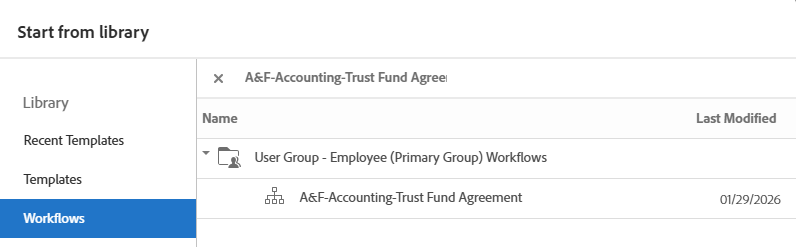
- On the left sidebar tap "Workflow"
- Using the search function type "A&F-Accounting-Trust Fund Agreement" to search for the form.
* All individuals including approvers and department contacts will need to have a AdobeSign account for this process. If you do not have a AdobeSign account, please go to AdobeSign and sign-in with your Single Sign on SFSU account.